Pending or Rejected: What a PHPVIP Withdrawal Problem Usually Means

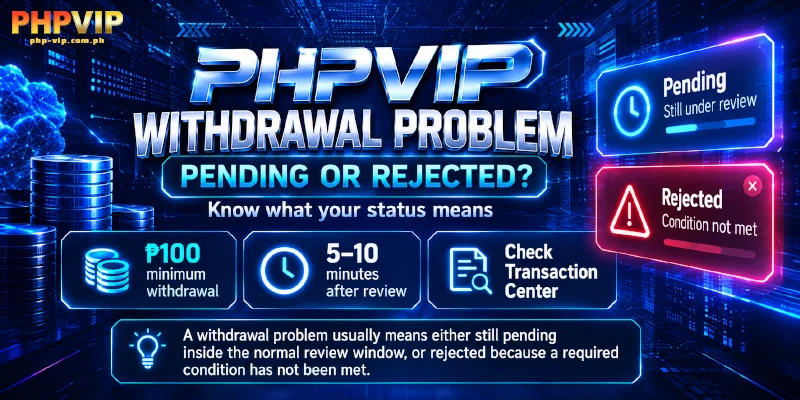
A PHPVIP withdrawal problem usually falls into one of two categories: still pending inside the normal review window, or rejected because a specific condition hasn’t been met. Withdrawals start at a ₱100 minimum with no maximum and normally clear within 5 to 10 minutes after review, so the first thing worth confirming is which category applies before assuming this withdrawal problem with PHPVIP has gone wrong for good.
Withdrawal Pending vs. Withdrawal Rejected: What’s the Difference?
A PHPVIP withdrawal pending in the Transaction Center simply means it’s still inside the 5 to 10 minute review window, or it’s waiting because only one withdrawal request gets processed at a time. A withdrawal rejected means the system has already reviewed it and found a condition that hasn’t been met, which needs fixing before resubmitting rather than just waiting out the clock. Checking the status there settles which cause behind a withdrawal problem with PHPVIP actually applies before anything else is tried.
Only One Withdrawal Request Processes at a Time
Only one withdrawal request per account processes at a time, so submitting a second request while the first is still pending doesn’t create a faster second attempt, it just sits behind the first one. A withdrawal that looks stuck often clears on its own once the earlier request finishes its review, without anything needing to be resubmitted or changed. Checking the Transaction Center for an existing pending request before assuming the newest one is broken saves a repeat submission that would only add to the queue, and this shape of a withdrawal problem with PHPVIP usually clears without any of the other causes applying at all.
A Withdrawal Password That Hasn’t Been Set Yet Blocks the Request
The withdrawal password is separate from the login password and must be set before the very first withdrawal request can go through at all. A member who has only set up a login password will find the withdrawal screen won’t submit anything until this second password exists in the Security tab of the account menu, which turns a withdrawal problem for PHPVIP into a setup step rather than an error. This is a blocker rather than a rejection, so it never shows up with a rejected status, the request form simply won’t go through until the password is in place.
Turnover Under 100% Blocks the Withdrawal
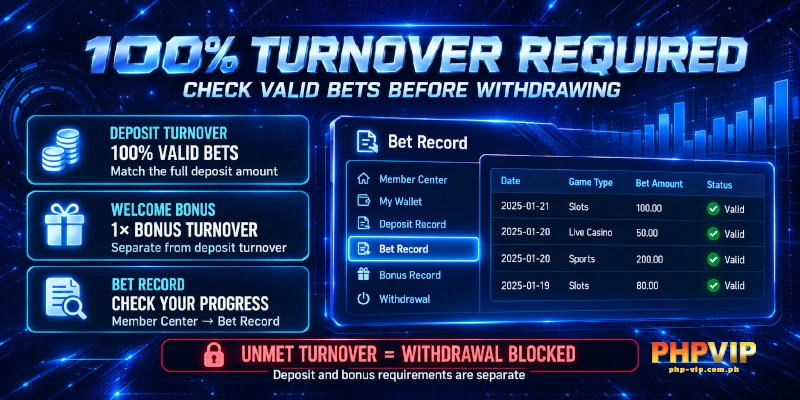
Valid bets have to reach 100% of each deposit before that deposit’s funds can be withdrawn, and any promotion claimed on top adds its own turnover requirement to that. A ₱118 to ₱6,888 welcome bonus claimed under the first deposit promotion carries a 1x turnover on that bonus amount alone, separate from the 100% already owed on the deposit itself, so a withdrawal problem with PHPVIP can surface even after the deposit side looks fully played through. Checking the Bet Record in the Member Center shows exactly how much betting has been done against how much was deposited and claimed, which settles whether this is the actual cause behind a withdrawal problem with PHPVIP before waiting on anything else.
Why a Name Mismatch Gets a Withdrawal Rejected
The full name entered at registration has to match the name on the bank account or e-wallet receiving the withdrawal, and this requirement was set the moment the account was created, not at the point of withdrawal. A GCash, PayMaya, or GrabPay account under a different name, or a bank card belonging to someone else, gets the request rejected regardless of how correctly the rest of the form was filled in, and this version of a withdrawal problem with PHPVIP can’t simply be resubmitted, the name on file has to change first. Because bank and e-wallet details can’t be edited after they’re submitted, a mismatch caught after linking an account needs support to correct rather than a simple resubmission.
Linking an Account Already Tied to Someone Else
Each member can link up to 2 cards, and a bank account already linked to another PHPVIP member can’t be linked to a second one, which is a different cause of a withdrawal problem with PHPVIP than a name mismatch even though both show up at the linking step. Bank Card withdrawals need the bank name, province, city, and account number entered correctly, while GCash, PayMaya, and GrabPay only need the name and mobile number tied to that wallet, so a wrong digit in either set stops the link the same way a duplicate account would. Support has to step in here as well, since none of these linking details can be changed after they’re submitted.
Additional Verification Can Extend the Review
Sometimes the review itself just takes longer, because PHPVIP is checking the account against its one-account-per-person policy before a decision gets made. That check flags matching contact details, a shared address or device, or the same payment method turning up under a second profile, and it may request paperwork proving who the account belongs to before releasing a decision. This isn’t a rejection and it isn’t the one-request-at-a-time queue described earlier, it’s the account being reviewed on its own timeline, and it holds the final call on what that review requires. Sending the requested paperwork through the same channel that asked for it moves a withdrawal problem with PHPVIP like this along faster than resubmitting the request, which does not restart or speed up a review that is waiting on paperwork rather than on funds.
When a PHPVIP Withdrawal Problem Needs Support Directly
If none of the causes above apply and the withdrawal has sat past the normal 5 to 10 minute review window, support can look into a PHPVIP withdrawal problem directly by calling (+63) 918 742 6051, emailing [email protected], messaging Telegram support, or opening 24/7 live chat. Having the withdrawal amount, the payout method, and the approximate time it was submitted ready before reaching out lets support confirm the status of this withdrawal problem with PHPVIP quickly instead of starting from a vague description.