
Download the PHPVIP App
The PHPVIP app installs differently depending on whether the phone is an iPhone or an Android: one uses a browser step, the other a downloaded PHPVIP APK file. Neither route goes through an app store, which is the part that trips most people up first, because both browsers and app stores feel like the expected place to start. Pick the section below that matches the phone in hand.
The PHPVIP App Isn’t on Either App Store
PHPVIP doesn’t list an app on the Apple App Store or on Google Play, and searching either store for it won’t turn up anything official, no matter which search terms are used. iPhone installs happen through a configuration profile added in Safari, while Android installs come from a PHPVIP app APK file downloaded straight off the website. Both routes end with the same app, just reached through different doors, and both work on any phone with enough storage free for the download, whether that phone is new or has been used for years without ever needing this kind of install before. The site is also reachable through a regular mobile browser without installing anything, because it works as an H5 mobile page on top of the desktop version, though that route stops short of the promotions the installed app makes available.
How to Install the PHPVIP App on iPhone
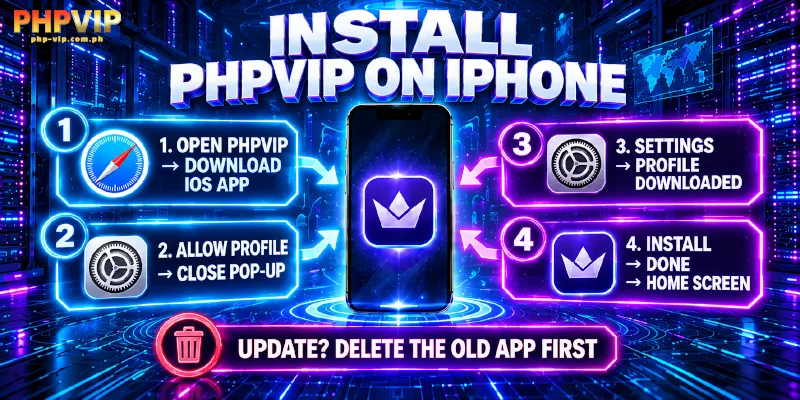
Installing on iPhone starts inside Safari, not the App Store, and every step below happens on the phone itself without needing a computer.
- Visit the PHPVIP website and tap Download iOS APP.
- Allow the configuration profile pop-up, then close it.
- Open Settings, find Profile Downloaded, and install it there.
- Tap Done and return to the home screen.
The configuration profile step is the part iOS uses instead of an App Store listing, and the warning screen it shows before installing is a normal part of that process rather than a sign of a problem. Anyone updating an existing install should delete the old app for PHPVIP first, because installing over it isn’t the supported path to a new version.
How to Install the PHPVIP App on Android
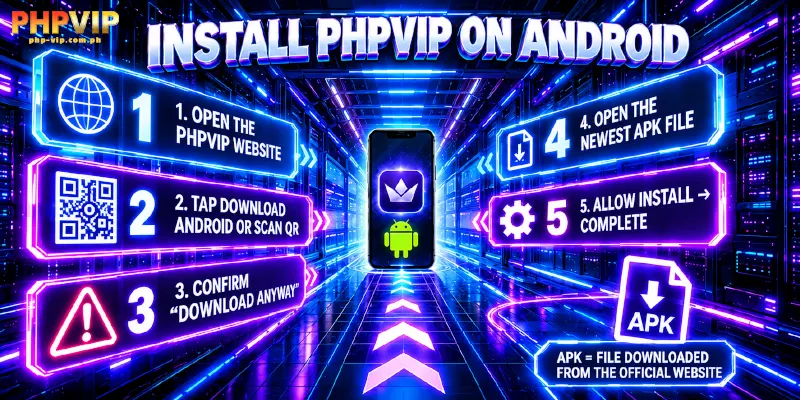
Getting the app on Android skips Safari entirely and goes straight to a file download, and like the iPhone route, the whole process runs on the phone itself from start to finish.
- Visit the website.
- Select Download Android, or scan the QR code and confirm Download Anyway when the phone flags it.
- Open the newest downloaded file once it finishes.
- Allow the install when prompted, then let it complete.
That “Download Anyway” prompt is Android’s standard warning for a file installed outside Google Play, not a sign anything went wrong with the download itself. The same warning appears for any APK from outside the Play Store, so it isn’t specific to this install. Once installed, the app icon behaves like any other app on the home screen, including showing up in the phone’s own app list for later updates or uninstalls.
What You Get Inside the App
The app from PHPVIP carries the same game library as the website, spanning Slots, Fishing, Live Casino, Cards, Sports, Sabong, and Lottery, along with the same Member Center menu covering deposits, withdrawals, Security, Referral, VIP status, and bet records. Switching the interface language between English and Filipino works the same inside the app as it does on the website.
What does change is promotions: every promotion on PHPVIP requires the official app specifically, so browser-only players see the same offers listed but can’t actually claim them. That includes the welcome bonus, reload deposit bonuses, the instant rebate, VIP rewards, referral commissions, and Member Day events, none of which can be claimed through a mobile browser or the desktop site. That single rule is the real reason to install the app from PHPVIP rather than stick with the website.
Get ₱50 for Downloading the App
Installing the app from PHPVIP pays out ₱50 once two things happen: at least one deposit goes through, and a screenshot of the completed install gets sent to support over Telegram or live chat. Neither step alone qualifies for the bonus. Sending it through the Telegram Support channel works the same way as using live chat, so either one gets the screenshot to the right place.
If the App Won’t Download or Install
Claiming that ₱50 assumes the install itself went through cleanly, which isn’t always the case: a network blocking the download page is the most common reason nothing at all loads, and the site points to the 1.1.1.1 app as one free way around that kind of block. Trying that before assuming the app itself is completely broken saves a repeat download for nothing. Storage space is worth checking too, given that a phone with too little free space can let a download for the app from PHPVIP start but fail partway through the install. Neither of those two checks requires reinstalling anything to test them out, so both are worth trying before starting the download over from scratch. Anything the two checks above don’t resolve with the app for PHPVIP is worth raising directly with support, available around the clock through live chat or Telegram.
App FAQs
A couple of things about the PHPVIP app come up outside the install steps themselves, mostly around cost, account setup, and how the app compares to using a browser instead.
Does the app cost anything to download?
No cost is stated for downloading or installing the app on either platform, and none of the account’s other features carry a separate download cost either, on the app or the website, now or later.
Can the website be used instead of the app?
For games, yes, since the same game library sits on both the app from PHPVIP and the website, with nothing missing from either version at all. For promotions, no, since every one of them requires the app for PHPVIP specifically rather than the browser version.
Does the app need a new account separate from the website?
No. The same account works on the app and the website, since login credentials aren’t tied to a specific platform or device.
Is the same 1.1.1.1 fix used for the website too?
Yes. PHPVIP recommends that same free 1.1.1.1 app for unblocked access whether the block is on the download page, the website, or the login screen, so it’s worth keeping installed even after the app itself is up and running.
Does the mobile browser version count as the app for promotions?
No. The H5 mobile site is still a browser, not the installed app, so it falls under the same rule as the desktop website: the games are there, but the promotions are not, regardless of which device or browser loads it.
Ready to Download the PHPVIP App?
Neither app install route from PHPVIP runs through an app store; both the configuration profile and the APK come straight from the same official site. iPhone goes through a configuration profile, Android through a direct APK, and both land on the same app from PHPVIP with the same game library and the same promotions once installed correctly. Getting the steps right the first time, including deleting an old install on iPhone before adding a new one and confirming Download Anyway on Android, avoids the most common reasons the process stalls partway through the very first attempt. From here, the steps above are the only thing standing between installing it and claiming the ₱50 that comes with a first deposit, with every other promotion on the account waiting on the other side of that same install, from the welcome bonus to VIP rewards and everything named further up the page.