Fixing a PHPVIP Login Problem: Four Common Causes

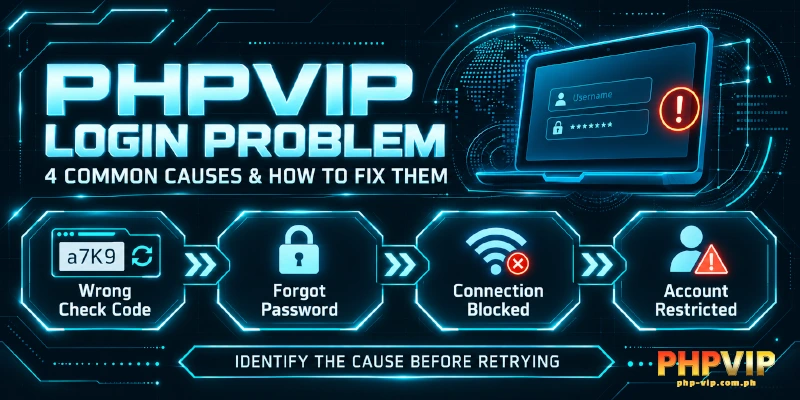
A PHPVIP login problem usually traces back to one of four causes: a mistyped Check Code, a forgotten password, a blocked connection, or a policy hold on the account. Matching the symptom to the right cause saves time before contacting support. Each cause below comes with the fix that applies to it, from a wrong Check Code to an account flagged for shared account details.
Check the Verification Code Before Anything Else
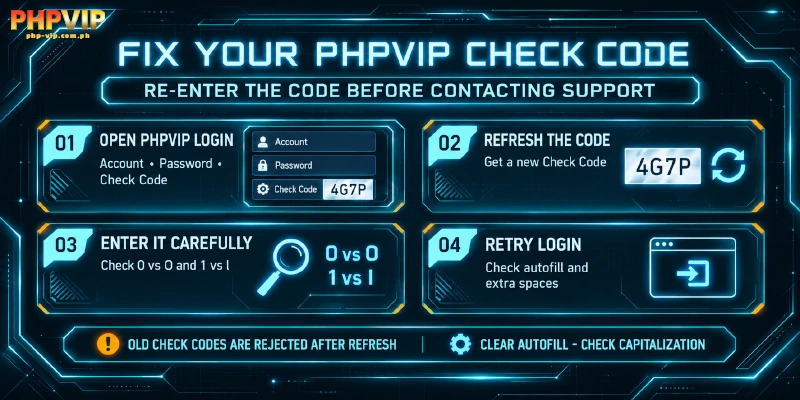
The login screen asks for three fields: Account, Password, and Check Code, and the Check Code is a common source of a login problem with PHPVIP. It is a short verification code that changes with every attempt, and a mistyped character here is a frequent reason for a failed attempt. The code refreshes each time the page reloads, so a code copied from a previous attempt is always rejected. Characters like the number zero and the letter O, or the number one and the letter I, are easy to mix up depending on the font, and typing quickly makes the mistake more likely. A login problem with PHPVIP at this stage rarely needs more than retyping the Check Code once, carefully, on a fresh page load, and a PHPVIP login problem caused by this field alone clears without any wait for support.
Autofill can work against the login screen too. Some mobile keyboards or browser autofill tools cover part of the code field or insert a cached value, so clearing the field manually and typing the code fresh is worth doing before assuming anything else is wrong. If the account or password fields were copied from a notes app, check for trailing spaces or accidental capitalization before blaming the Check Code for what is really a problem with the password field itself. A login problem of this kind with PHPVIP is rarely anything more than a mistyped character, and this kind of login problem rarely needs anything from PHPVIP’s side once the code is entered correctly.
Forgot Your Account or Password?
There is no self-service password reset option, so a login problem caused by a forgotten password goes through the support team instead of an automated link or email. Repeatedly guessing a password is not a safe workaround, because the account policy covered further down can flag unusual login attempts on its own. This is also where a login password gets confused with the separate withdrawal password some players set up later inside the member center, so it is worth knowing they are two different credentials before assuming either one is broken. Being asked for the withdrawal password during a cash-out is unrelated to this kind of login problem with PHPVIP entirely, as the two passwords protect different actions. A login problem for PHPVIP that needs attention beyond the Check Code can be reviewed from the Security section of the member center once access is restored, where both the login and withdrawal passwords are managed.
A PHPVIP login error that repeats after several careful attempts, with the Check Code entered correctly each time, usually means the account credentials themselves need a reset by support, not another retry. A login problem like this with PHPVIP clears up once support resets the credentials directly, and support hours run 24/7, the same coverage used for deposit and withdrawal handling. Support can be reached through live chat on the website or app, by email at [email protected], or by phone at (+63) 918 742 6051, and any of these channels can resolve a login problem with PHPVIP tied to forgotten credentials. Have your registered full name ready, since PHPVIP may ask for identity documents such as a photo ID before restoring access, and a PHPVIP can’t login report without that name on hand usually takes longer to resolve. A repeat login problem with PHPVIP after a password reset almost always means the new password was mistyped on the way back in.
The Site May Be Unreachable From Your Connection
The site is often unreachable because of a network restriction, not an account issue, and this shows up as a blank page or a connection timeout rather than an actual error message. Some internet providers restrict access to gaming platforms at the network level, which looks identical to a broken login from the player’s side even though the account itself is fine. This kind of login problem points to PHPVIP’s network reachability, not the account itself, and no amount of retyping the password changes that. PHPVIP’s login problem tag in this case belongs to the connection, not the account, and this particular login problem with PHPVIP shows up identically whether using the app or the website.
One official fix for this situation is the 1.1.1.1 app, a free tool that routes traffic around this kind of blocking so the site loads normally. Switching between mobile data and Wi-Fi is a quick way to confirm the connection is the issue before installing anything, and if the site loads normally on the other network, this login problem points to PHPVIP’s reachability from that specific connection, not the account. A PHPVIP login problem tied to network access disappears once the connection changes or the restriction lifts, without any change needed on the account side, and a problem coming from its own servers would show the same symptom on both networks instead of clearing up. A login problem with PHPVIP tied to network access affects the website and the Android or iOS app equally, since all of them run on the same account and the same connection.
A PHPVIP Login Problem Can Signal a Blocked Account
PHPVIP‘s login problem list would not be complete without the account-policy case, because it allows only one account per person and blocks logins when the same registered name, home address, email, phone number, withdrawal payment method, or device is shared across more than one account. Two accounts sharing the same device, network, or payment method can trigger this policy even without any intent to break a rule, since the overlap itself is what the check looks for. An Intrusion Detection System monitors network traffic around the clock, and an account matched under the one-account policy is not always closed permanently, though it reserves the right to close it and forfeit any funds inside it. It may also ask for documentation to confirm identity and eligibility before deciding whether to lift the block, and that decision is final. This login problem angle with PHPVIP, the account policy, is the least common of the four and generally needs support to resolve, and if none of the causes above explain what you are seeing, its 24/7 live chat, email, or phone line can review the account directly.